
안녕하세요 MANVSCLOUD 김수현입니다.
퍼블릭 클라우드 환경에서의 루트 계정 사용은 보안상 매우 민감하고 위협이 될 수 있는 행동입니다. 루트 계정은 클라우드 서비스에서 가장 강력한 권한을 가지고 있으며 이 계정으로 수행할 수 있는 작업은 거의 제한이 없습니다. 이러한 광범위한 권한 때문에 루트 계정은 고도로 보호되어야 하며 일상적인 작업에 사용되어서는 안 됩니다.
루트 계정을 직접 로그인하여 사용하는 행위나 루트 계정에서 액세스 키를 생성하여 사용하는 행위는 무단 액세스, 데이터 유출, 비용 상승 등으로 기업에게 치명적인 손상을 입힐 수 있습니다.
오늘 포스팅에서는 네이버 클라우드의 Cloud Activity Tracer API와 Cloud Functions를 사용하여 루트 계정의 비정상적인 사용을 막기 위해 루트 계정 보안 모니터링 설정하는 방법을 공유드리고자 합니다.
Cloud Activity Tracer

실습 과정을 진행하기 전 Cloud Activity Tracer에 대해서 먼저 알아야합니다.
Cloud Activity Tracer는 사용자의 네이버 클라우드 플랫폼 내에서 발생하는 모든 계정 활동(접근 기록, 이벤트 로그 등)을 수집, 관리, 분석할 수 있는 서비스입니다.
Cloud Activity Tracer 서비스 역시 네이버 클라우드에서 API로 제공하고 있는데요.
즉 Cloud Activity Tracer API를 이용한다면 특정 계정 행동을 실시간으로 모니터링할 수 있는 시스템을 만들고 필요한 경우 신속한 대응을 할 수 있습니다.
실습 과정에서 우리는 Cloud Activity Tracer API와 Cloud Functions을 이용하여 서버리스 보안 모니터링 시스템을 구축할 것입니다.
Hands On Lab
1) Cloud Functions에서 Action을 생성합니다.
2) 기본 정보
- 타입 : 일반 액션
- 이름 : ex) manvscloud-root-detection-action
3) 소스 코드
- 런타임 : Python:3.11
- 타입 : 코드
import hashlib
import hmac
import base64
import requests
import time
import json
import datetime

def format_event_time(timestamp):
    timestamp_seconds = timestamp / 1000
    dt_object = datetime.datetime.fromtimestamp(timestamp_seconds)
    return dt_object.strftime('%Y-%m-%d %H:%M:%S')

def send_slack_message(webhook_url, message):
    slack_data = {'text': message}
    response = requests.post(webhook_url, json=slack_data, headers={'Content-Type': 'application/json'})

    if response.status_code != 200:
        raise ValueError(f'Request to slack returned an error {response.status_code}, the response is:\n{response.text}')

def generate_slack_message(item, event_type):
    formatted_time = format_event_time(item['eventTime'])
    source_ip = item['sourceIp']
    user_name = item['resourceName']
    country_code = item['productData'].get('clientIpCountry', 'N/A')
    two_factor_type = item['productData'].get('twoFactorLoginType', '')
    two_factor_info = f"({two_factor_type})" if two_factor_type else ""

    if event_type == "login":
        return f'[주의] [{formatted_time}] "{source_ip}"({country_code})에서 "{user_name}"{two_factor_info} ROOT 계정으로 네이버 클라우드 포탈 로그인에 성공하였습니다.'
    elif event_type == "access_key_creation":
        return f'[경고] [{formatted_time}] "{source_ip}"에서 "{user_name}" ROOT 계정의 Access Key를 생성하였습니다.'

def main(args):
    access_key = args["NCLOUD_ACCESS_KEY"]
    secret_key = args["NCLOUD_SECRET_KEY"]
    webhook_url = args["WEBHOOK_URL"]

    timestamp = int(time.time() * 1000)
    timestamp = str(timestamp)

    secret_key = bytes(secret_key, 'UTF-8')

    method = "POST"

    api_server = "https://cloudactivitytracer.apigw.ntruss.com"
    uri = "/api/v1/activities?responseFormatType=json"

    message = method + " " + uri + "\n" + timestamp + "\n" + access_key
    message = bytes(message, 'UTF-8')
    signingKey = base64.b64encode(hmac.new(secret_key, message, digestmod=hashlib.sha256).digest())

    http_header = {
        'Content-Type': 'application/json',
        'x-ncp-apigw-signature-v1': signingKey,
        'x-ncp-apigw-timestamp': timestamp,
        'x-ncp-iam-access-key': access_key
    }

    ms = int(time.time() * 1000)
    start_time = ms - (1 * 60 * 1000)
    start_time = str(start_time)

    payload = {
        "fromEventTime": start_time,
        "pageSize": 100
    }

    response = requests.post(api_server + uri, headers=http_header, json=payload)
    data = json.loads(response.text)

    for item in data.get('items', []):
        if item['productDisplayName'] == "Account" and item['actionResultType'] == "SUCCESS":
            if item['resourceType'] == "Customer" and 'twoFactorLoginType' in item['productData']:
                message = generate_slack_message(item, "login")
                send_slack_message(webhook_url, message)
            elif item['resourceType'] == "AccessKey" and item['productData'].get('active') == "true":
                message = generate_slack_message(item, "access_key_creation")
                send_slack_message(webhook_url, message)

    return {"message": "Execution completed successfully"}
- 디폴트 파라미터
{"WEBHOOK_URL":"YOUR_WEBHOOK_URL","NCLOUD_ACCESS_KEY":"YOUR_ACCESS_KEY","NCLOUD_SECRET_KEY":"YOUR_SECRET_KEY"}
- WEBHOOK_URL : 알림을 받을 Slack의 Webhook URL
- NCLOUD_ACCESS_KEY : Cloud Activity Tracer에서 Activity 목록을 볼 수 있는 권한을 가진 액세스 키
- CLOUD_SECRET_KEY : Cloud Activity Tracer에서 Activity 목록을 볼 수 있는 권한을 가진 액세스 키의 시크릿 키
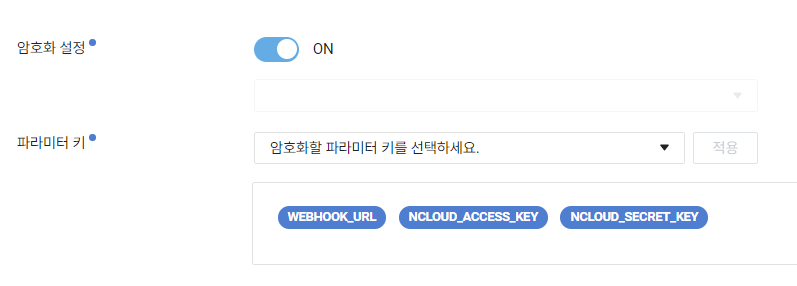
디폴트 파라미터 입력 후 암호화 설정을 ON으로 설정하여 각각의 파라미터 키를 암호화 적용합니다. 만약 KMS(Key Management Service)가 생성되어있지 않다면 KMS를 먼저 생성해주세요.
Action이 정상적으로 생성되었다면 이제 Trigger를 생성하고 Action을 연결해줍시다.
4) Trigger 생성
5) 트리거 기본 정보
- 이름 : ex) manvscloud-root-detection-trg
- 타입 : Cron
- 실행 옵션 : */1 * * * *
6) 액션 연결 (위에서 생성한 Action을 연결합니다.)
여기까지 완료되었다면 Root 계정으로 네이버 클라우드 포탈에 로그인 시도 및 액세스 키를 생성하여 Slack 알림이 오는지 확인합니다.
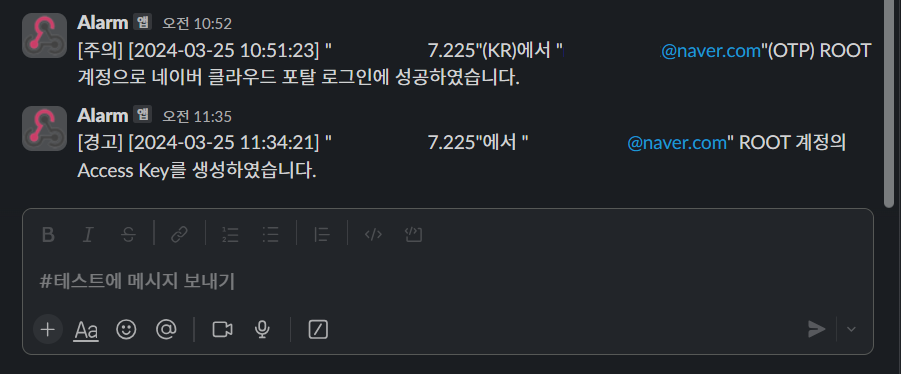
[주의] 테스트 시 생성한 Root 계정의 액세스 키는 반드시 삭제해주세요.
Personal Comments
지금까지 네이버 클라우드의 Cloud Activity Tracer와 Cloud Functions를 결합한 서버리스 보안 모니터링 시스템 구축을 만들어보았습니다.
해당 모니터링 설정은 퍼블릭 클라우드 환경에서의 보안을 강화하는 효과적인 전략입니다.
이제 루트 계정 활동을 실시간으로 모니터링하고 위험 상황 발생 시 즉각적인 알림을 제공함으로써 보안 사고에 대응하는 속도를 높여줄 것입니다.
이 과정을 통해 간단하고 비용 효율적으로 네이버 클라우드에서 발생할 수 있는 루트 계정 보안 위협을 해결할 수 있었습니다.
긴 글 읽어주셔서 감사합니다.

No Comments