
안녕하세요 MANVSCLOUD 김수현입니다.
네이버 클라우드의 Object Storage 서비스는 데이터 저장과 관리에 있어서 탁월한 선택지로 자리 잡고 있습니다. 그러나 많은 사용자들이 한 가지 중요한 문제에 직면하고 있는데요.
바로 버킷 암호화 설정을 했을 때 수명 주기 관리 기능의 제한입니다.
이는 데이터 보안을 강화하고자 하는 사용자들에게 큰 도전과제로 다가올 수 있습니다.그렇다면 이러한 제한을 어떻게 극복할 수 있을까요?
다행히도 네이버 클라우드에서는 Object Storage API를 제공하고 있어 Cloud Functions과 함께 사용한다면 이 문제를 쉽게 해결할 수 있습니다. 이 포스트에서는 암호화된 Object Storage 버킷에 대해 수명 주기 관리를 효과적으로 수행하는 방법을 안내해 드리려고 합니다.
이를 통해 데이터 보안을 유지하면서도 효율적으로 데이터를 관리할 수 있는 방법을 알아보겠습니다.
Object Storage 암호화
Object Storage 버킷을 암호화하는 것은 현대 클라우드 컴퓨팅 환경에서 필요로 하는 보안 조치 중 하나입니다.
많은 보안 표준과 프레임워크는 데이터를 저장할 때 암호화를 기본 요구사항으로 삼고 있는데요. ISO 27001, NIST, PCI DSS 등과 같은 표준들은 암호화를 통해 데이터 보호를 강조합니다.
이런 보안 심사는 기업이나 기관이 사이버 공격, 데이터 유출, 해킹 시도 등 다양한 위협으로부터 자신의 데이터를 어떻게 보호하는지를 평가하며 데이터 암호화는 중요한 방어 수단으로 간주하고 있는데 이와 같이 Object Storage 버킷을 암호화하는 것은 데이터 보안을 강화하고 다양한 규정과 보안 표준을 충족시키며 기업과 기관이 보안 심사에서 긍정적인 평가를 받을 수 있도록 합니다.
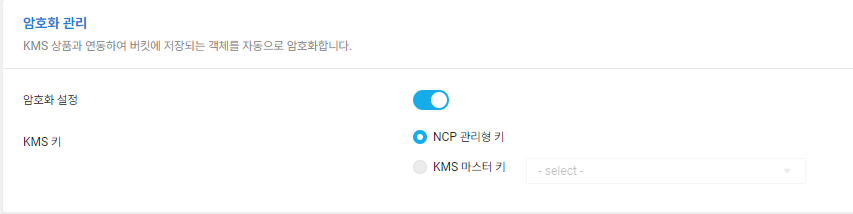
네이버 클라우드의 Object Storage도 암호화 관리 설정을 통해 버킷 내 객체를 자동으로 암호화할 수 있습니다. 하지만 이와 같이 암호화 설정을 할 경우 Object Storage 기능 중 하나인 ‘Lifecycle Management’를 사용할 수 없는 점인데요.

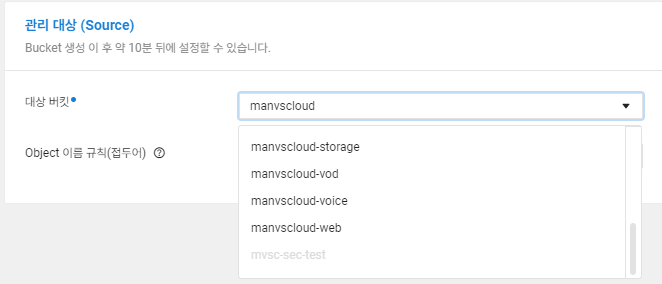
위 그림과 같이 암호화된 mvsc-sec-test 버킷에 대해서는 수명 주기 관리 대상 버킷으로 선택할 수 없는 것을 확인할 수 있습니다.
그렇다면 암호화된 버킷 내 객체들은 어떻게 수명 주기를 설정할 수 있을지 Hands On을 통해 알아보도록 하겠습니다.
Hands On
# VPC, Server 생성에 대한 가이드는 생략합니다.
# Python은 3.11 버전이 사용되었습니다.
- 주의사항 (1) : Cloud Functions에서는 Boto3 라이브러리를 내장하고 있지 않기때문에 boto3 라이브러리를 포함시켜 압축한 후 .zip 파일로 업로드할 것입니다.
"2023-12-26T03:52:10.60211601Z  stderr: Traceback (most recent call last):"
"2023-12-26T03:52:10.602137684Z stderr: File "exec__.py", line 42, in <module>"
"2023-12-26T03:52:10.602141788Z stderr: from main__ import main as main"
"2023-12-26T03:52:10.602144077Z stderr: File "/action/1/bin/main__.py", line 3, in <module>"
"2023-12-26T03:52:10.602147112Z stderr: import boto3"
"2023-12-26T03:52:10.602149144Z stderr: ModuleNotFoundError: No module named 'boto3'"
"2023-12-26T03:52:10.607916982Z stderr: Command exited abruptly during initialization."
- 주의사항 (2) : Boto3는 2023년 12월 13일부터 Python 3.7을 더 이상 지원하지 않기때문에 3.8 이상 버전으로 사용이 필요합니다.
"2023-12-26T04:24:05.996379353Z stderr: /action/1/bin/boto3/compat.py:82: PythonDeprecationWarning: Boto3 will no longer support Python 3.7 starting December 13, 2023. To continue receiving service updates, bug fixes, and security updates please upgrade to Python 3.8 or later. More information can be found here: https://aws.amazon.com/blogs/developer/python-support-policy-updates-for-aws-sdks-and-tools/"
"2023-12-26T04:24:05.996387502Z stderr: warnings.warn(warning, PythonDeprecationWarning)"
아래 예시는 Linux 환경을 기준으로 작성되었습니다.
- 코드 작성 및 .zip 파일 생성
mkdir obj_lifecycle
cd obj_lifecycle
python -m venv venv
source venv/bin/activate
pip install boto3
pip install requests
cp -r venv/lib/python3.11/site-packages/* .
vi main__.py
venv를 이용하여 가상 환경을 만들어준 뒤 boto3를 install하고 main__.py를 작성하였습니다.
import json
import base64
import boto3
import requests
from datetime import datetime, timedelta

service_name = "s3"
endpoint_url = "https://kr.object.ncloudstorage.com"
region_name = "kr-standard"

S3 = None

def set_response(status_code, body):
    return {
        "Content-Type": "application/json",
        "statusCode": status_code,
        "body": json.dumps(body),
    }

def set_S3_client(access_key, secret_key):
    print("--- new object storage client ---")
    return boto3.client(
        service_name,
        endpoint_url=endpoint_url,
        aws_access_key_id=access_key,
        aws_secret_access_key=secret_key,
    )

def delete_old_files(bucket_name, prefix, days_old):
    try:
        global S3
        response = S3.list_objects_v2(Bucket=bucket_name, Prefix=prefix)
        if 'Contents' not in response:
            return []

        deleted_files = []
        for item in response['Contents']:
            last_modified = item['LastModified']
            if datetime.now(last_modified.tzinfo) - last_modified > timedelta(days=days_old):
                S3.delete_object(Bucket=bucket_name, Key=item['Key'])
                deleted_files.append(item['Key'])
        return deleted_files

    except Exception as e:
        print("Error in deleting old files.")
        raise e

def main(args):
    try:
        global S3
        if S3 is None:
            S3 = set_S3_client(args["access_key"], args["secret_key"])

        method = args["__ow_method"]
        path = args["__ow_path"]
        path_components = path.split("/")

        # 처리할 경로와 버킷 이름 지정
        bucket_name = args["bucket_name"]
        target_prefix = args["bucket_path"]

        # 파일 삭제 기능 실행
        if method == "delete" and len(path_components) == 2 and path_components[1] == "cleanup":
            days_old = int(args.get('expiration_date', 180))  # 기본값 180일
            deleted_files = delete_old_files(bucket_name, target_prefix, days_old)
            return set_response(200, {"deleted_files": deleted_files})

        # 기타 다른 HTTP 메소드 처리 부분을 여기에 추가할 수 있습니다.

    except Exception as e:
        print(e)
        return set_response(500, {"error": "An unexpected error occurred."})
작성된 main__.py의 코드는 위와 같고 이후 압축되어야할 파일들은 아래 목록이 될 것입니다.
(venv 디렉토리는 삭제해버립시다 용량만 차지하니까요?)
total 76
drwxr-xr-x 10 root root  4096 Dec 26 13:34 boto3
drwxr-xr-x  2 root root   133 Dec 26 13:34 boto3-1.34.7.dist-info
drwxr-xr-x  8 root root  4096 Dec 26 13:34 botocore
drwxr-xr-x  2 root root   120 Dec 26 13:34 botocore-1.34.7.dist-info
drwxr-xr-x  3 root root   112 Dec 26 13:34 certifi
drwxr-xr-x  2 root root   102 Dec 26 13:34 certifi-2023.11.17.dist-info
drwxr-xr-x  4 root root  4096 Dec 26 13:34 charset_normalizer
drwxr-xr-x  2 root root   126 Dec 26 13:34 charset_normalizer-3.3.2.dist-info
drwxr-xr-x  6 root root  4096 Dec 26 13:34 dateutil
drwxr-xr-x  3 root root    63 Dec 26 13:34 _distutils_hack
-rw-r--r--  1 root root   151 Dec 26 13:34 distutils-precedence.pth
drwxr-xr-x  3 root root   190 Dec 26 13:34 idna
drwxr-xr-x  2 root root    84 Dec 26 13:34 idna-3.6.dist-info
drwxr-xr-x  3 root root   167 Dec 26 13:34 jmespath
drwxr-xr-x  2 root root   106 Dec 26 13:34 jmespath-1.0.1.dist-info
-rw-r--r--  1 root root  2447 Dec 26 13:35 main__.py
drwxr-xr-x  5 root root   136 Dec 26 13:34 pip
drwxr-xr-x  2 root root   166 Dec 26 13:34 pip-23.2.1.dist-info
drwxr-xr-x  5 root root    73 Dec 26 13:34 pkg_resources
drwxr-xr-x  2 root root    33 Dec 26 13:34 __pycache__
drwxr-xr-x  2 root root   118 Dec 26 13:34 python_dateutil-2.8.2.dist-info
drwxr-xr-x  3 root root  4096 Dec 26 13:34 requests
drwxr-xr-x  2 root root   119 Dec 26 13:34 requests-2.31.0.dist-info
drwxr-xr-x  3 root root  4096 Dec 26 13:34 s3transfer
drwxr-xr-x  2 root root   124 Dec 26 13:34 s3transfer-0.10.0.dist-info
drwxr-xr-x  8 root root  4096 Dec 26 13:34 setuptools
drwxr-xr-x  2 root root   143 Dec 26 13:34 setuptools-65.5.0.dist-info
drwxr-xr-x  2 root root   102 Dec 26 13:34 six-1.16.0.dist-info
-rw-r--r--  1 root root 34549 Dec 26 13:34 six.py
drwxr-xr-x  5 root root  4096 Dec 26 13:34 urllib3
drwxr-xr-x  3 root root    82 Dec 26 13:34 urllib3-2.0.7.dist-info
zip -r obj_lifecycle.zip *
Cloud Functions으로 업로드할 수 있도록 .zip 파일로 압축이 되었다면 Cloud Functions Action에서 파일을 업로드 해줍시다.

- Cloud Functions
디폴트 파라미터는 아래와 같이 설정해줄 수 있습니다.
VPC ID는 Access Control Group(ACG)가 존재하는 VPC에서 확인할 수 있으며 OBJ_ACCESS_KEY와 OBJ_SECRET_KEY는 Object Storage의 권한이 있는 최소한의 권한이 부여된 API용 Sub Account의 Access Key와 Secret key 등을 입력해줍니다.
{"expiration_date":"180","bucket_path":"cat-tracer/","__ow_method":"delete","access_key":"AAAAAAAAAAAAAAAAA","secret_key":"BBBBBBBBBBBBBBBBBBBBBBBBBBBB","__ow_path":"/cleanup","bucket_name":"mvsc-sec-test"}
- expiration_date : 만료일
- bucket_path : 버킷 내 수명 주기 경로
- __ow_method : 요청 메소드
- access_key : Object Storage 객체 삭제가 가능한 권한이 있는 ACCESS KEY
- secret_key : Object Storage 객체 삭제가 가능한 권한이 있는 SECRET KEY
- __ow_path : Cloud Functions 환경에서 HTTP 요청의 경로(URL의 일부)를 나타내는 변수
- bucket_name : 암호화 설정된 Object Storage의 버킷 이름
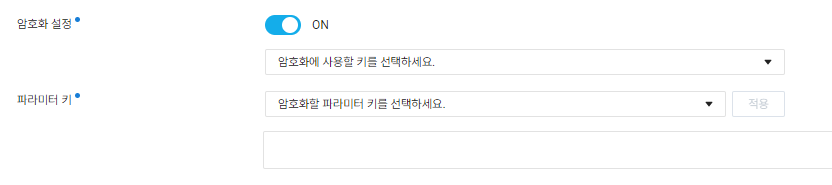
KMS 키를 생성하고 Cloud Functions 내 암호화 설정을 이용하여 설정한 파라미터의 값을 암호화할 수 있습니다. 즉, 디폴트 파라미터에 입력된 ACCESS KEY, SECRET KEY 등을 암호화할 수 있게됩니다.
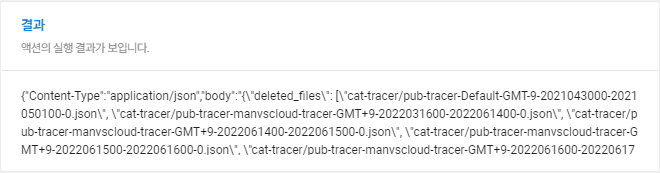
위 Action을 Cron과 같은 트리거를 함께 사용한다면 하루에 한번씩 특정 기간이 넘어가는 파일을 삭제하여 암호화된 Object Storage의 비용을 최적화할 수 있습니다.
Personal Comments
네이버 클라우드를 사용하면서 Object Storage의 가격이 Block Storage보다 저렴하지만 지속적으로 관리되지 않고 파일이 쌓이게 된다면 비용은 어느순간 기하급수적으로 늘어나있을 것입니다. 이때 암호화된 Object Storage를 Lifecycle Management로 관리할 수 없다면 이를 대안으로 요청이 1,000,000 (건) 이하일 경우, 소요시간이 400,000 (GB-초) 이하인 경우 무료로 사용할 수 있고 그 이상 사용하더라도 사용한만큼만 비용이 발생하는 Serverless 서비스인Cloud Functions을 활용하여 Object Storage 버킷 내 파일들을 쉽게 관리하고 비용을 최적화할 수 있습니다.
긴 글 읽어주셔서 감사합니다.
